The idea for a contacts app for the Playdate is as old as the release of the SDK with third-party network access.
Design
The screen format almost automatically dictates that the data be displayed in the form of a business card. If you spend some time thinking about how to tie that in with the crank for navigation, you almost automatically end up with an analogy to a spiral-bound notebook.
After a few attempts that seemed a bit odd, the design turned out to be relatively simple. A row of black circles and a few diagonal lines with a “light effect” (within the limits of a 1-bit display) later, the whole thing already looked pretty good.
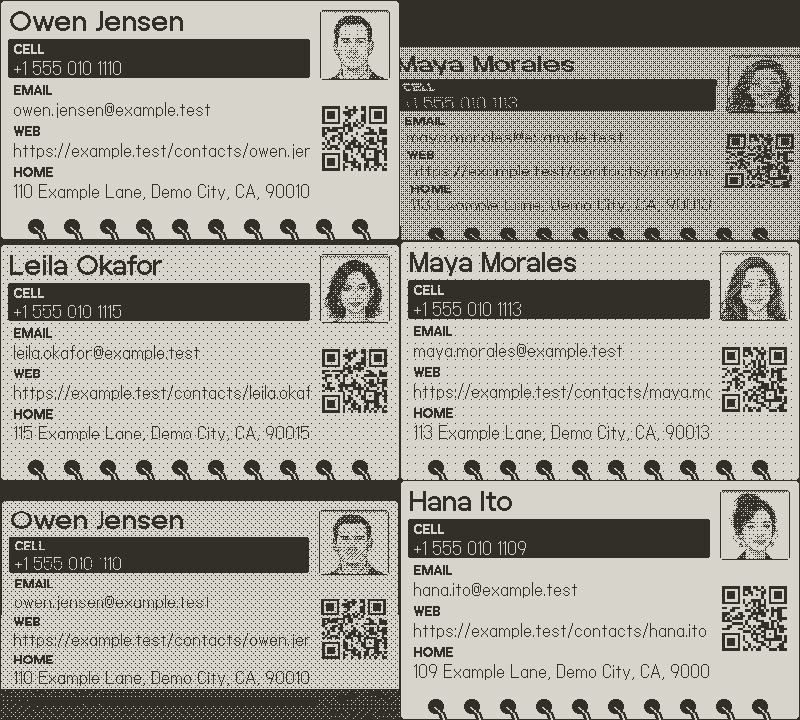
The only real challenge was getting the perspective distortion and shading to look reasonably smooth.
To make the whole thing truly useful, the selected field is encoded into a QR code. You can scan this code with your smartphone camera and then call the phone number directly.
Data
My first thought was to export the data from the address book and upload it as a file to a web server. Of course, that’s not such a good idea (since it would surely include every contact stored with a phone number or email address). So I decided to take the harder route: importing via CalDAV.
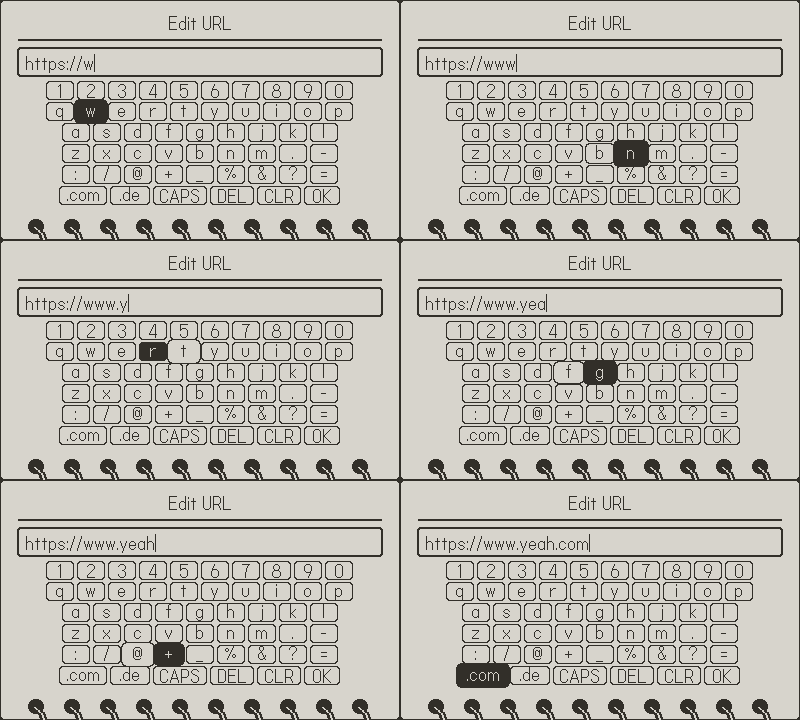
Since I’m using Embedded Swift (which is based on the C library), I unfortunately couldn’t use the keyboard available through Lua CoreComponents. So, in addition to the actual data entry, I first had to build a screen-based input method. I deliberately chose not to replicate the Playdate’s Picker Wheel keyboard. For one thing, it would likely have turned out very similar but still different (the uncanny valley effect); for another, shortcuts for URLs and buttons to show/hide characters in the secure field wouldn’t have been possible. Here’s how it turned out in the end:
Actually loading the data was almost straightforward—I was able to test it directly against my Nextcloud instance. After a bit of
- HTTP/HTTPS
- authentication using Basic or Digest authentication
- WebDAV to find accounts and existing address books
- CardDAV to select an address book and request the contacts
- parsing the received XML and loading the vCards from it
- and also extracting the contact photo contained therein as a Base64-encoded JPEG or PNG
Displaying the user avatars was another small challenge. They have to be decoded and dithered. The result isn’t great, but you can still recognize something or someone. :)
Unfortunately, there’s no Keychain or Secure Enclave on the Playdate, so you can only store the login and user data in encrypted form yourself and hide the key as best as possible.
Now that the contacts are working, the next logical step is to try using the existing connection for CalDAV. Calendar and Kurbel—that sounds pretty good.